Lab 2: One-predictor Regression

Fabio Setti

PSYC 7804 - Regression with Lab

Today’s Packages and Data 🤗

Install Packages Code
install.packages("rio")
install.packages("psych")
install.packages("tidyverse")
install.packages("car")
library(car)
library(psych)
library(tidyverse)
theme_set(theme_classic(base_size = 16, 
                        base_family = 'serif'))


The car package (Fox et al., 2024) contains many helper functions to analyze and explore regression results. It was originally created to be used along a regression book written by the same authors.

The tidyverse package (Wickham & RStudio, 2023) loads a suite of packages that help with data cleaning and visualization. Among others, tidyverse loads both dplyr and ggplot2.

The psych package (Revelle, 2024) includes MANY functions that help with data exploration and running analyses typically done in the social sciences.

Data


GPA <- rio::import("https://github.com/quinix45/PSYC-7804-Regression-Lab-Slides/raw/refs/heads/main/Slides%20Files/Data/GPA.sav")

str(GPA, vec.len = 2)
'data.frame':   20 obs. of  2 variables:
 $ year1gpa: num  1.53 2.77 3.15 2.4 2.46 ...
  ..- attr(*, "label")= chr "First-year college GPA"
  ..- attr(*, "format.spss")= chr "F8.2"
 $ act     : num  20 20 21 22 22 ...
  ..- attr(*, "label")= chr "ACT scores"
  ..- attr(*, "format.spss")= chr "F8.0"

Describe and Plot your data

Whenever working with new data it’s good practice to run descriptive statistics and visualizations

# run in your R to get clearer output
describe(GPA)
         vars  n  mean   sd median trimmed  mad  min   max range  skew kurtosis
year1gpa    1 20  2.62 0.64   2.72    2.65 0.49  1.1  3.86  2.76 -0.41     0.04
act         2 20 24.25 2.59  24.00   24.25 2.97 20.0 30.00 10.00  0.15    -0.66
           se
year1gpa 0.14
act      0.58


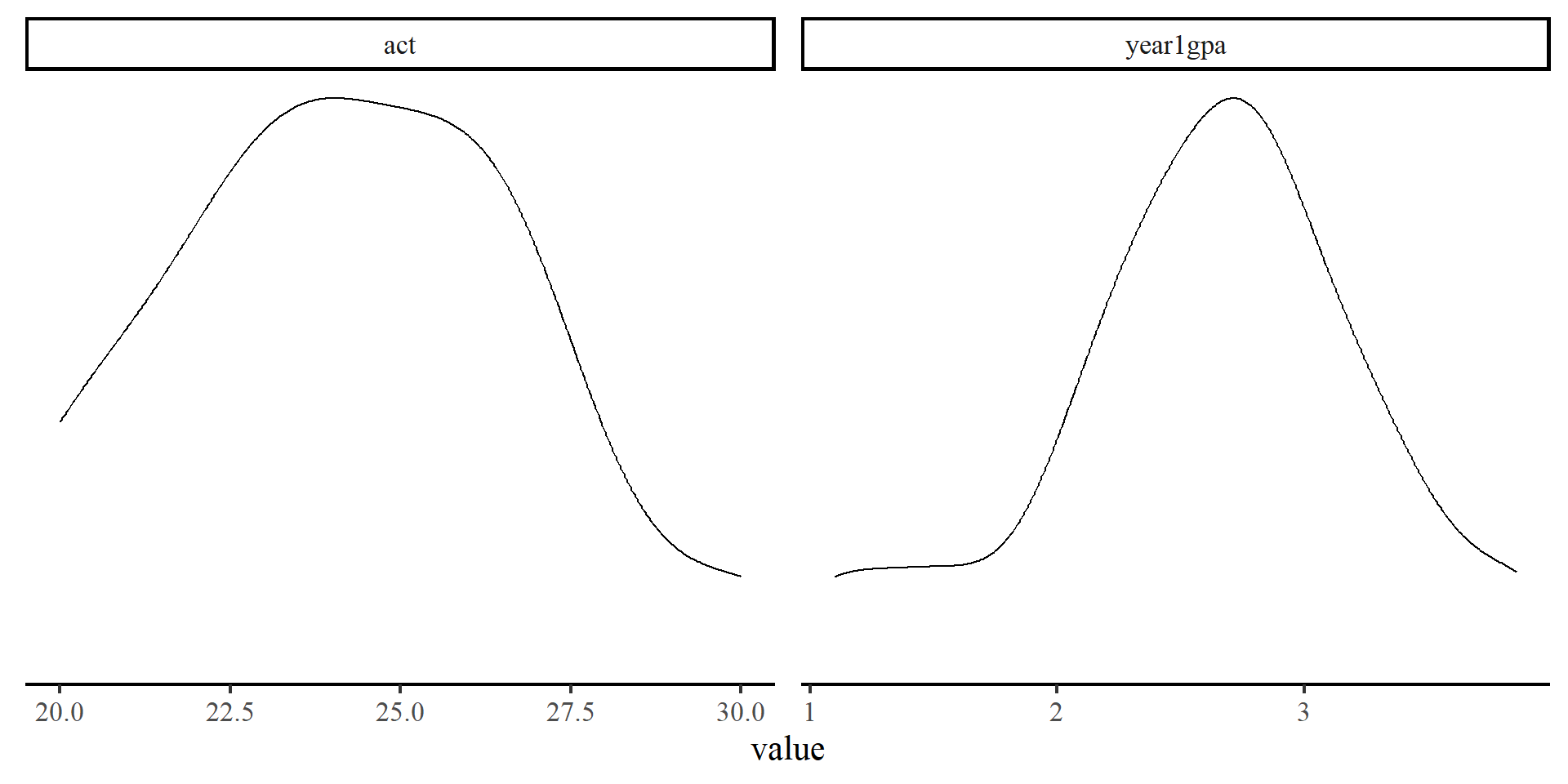
The two variables seem fairly normally distributed.

Plot code
GPA %>% 
# When creating multiple plots at once, long data works best
pivot_longer(cols = colnames(GPA),
             names_to = "variable",
             values_to = "value") %>% 
          ggplot(aes(x  = value)) +
          geom_density() +
# the facet_wrap() fucntion generates plots for each value in "variable"
          facet_wrap(~variable, scales = "free") +
  theme(axis.title.y=element_blank(),
        axis.text.y=element_blank(),
        axis.ticks.y=element_blank(),
        axis.line.y =  element_blank())

Scatterplot

A scatterplot is ideal for visualizing bivariate relations

We have seen this code before

ggplot(GPA,
      aes(x = act, y = year1gpa)) +
      geom_point()

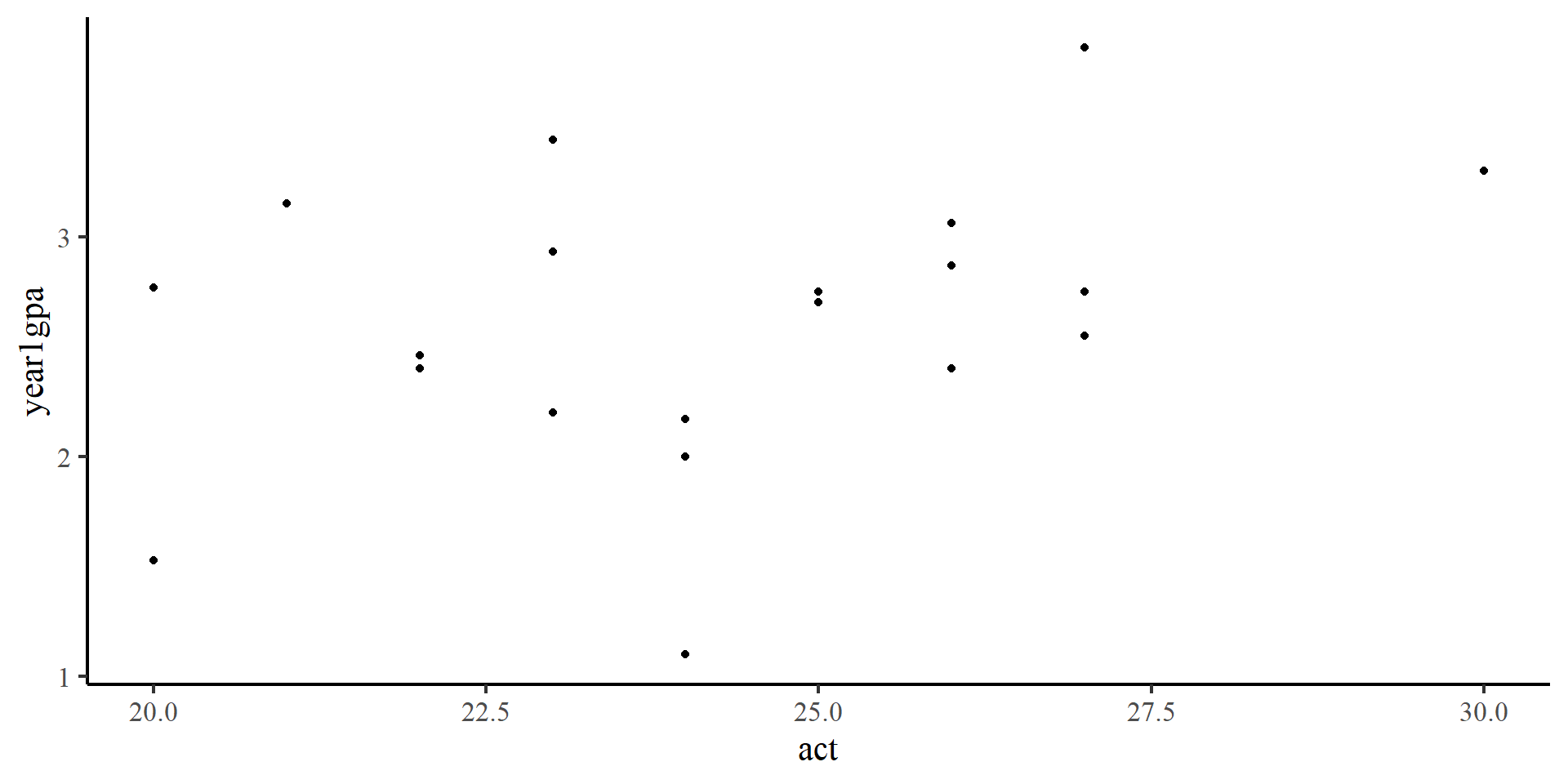
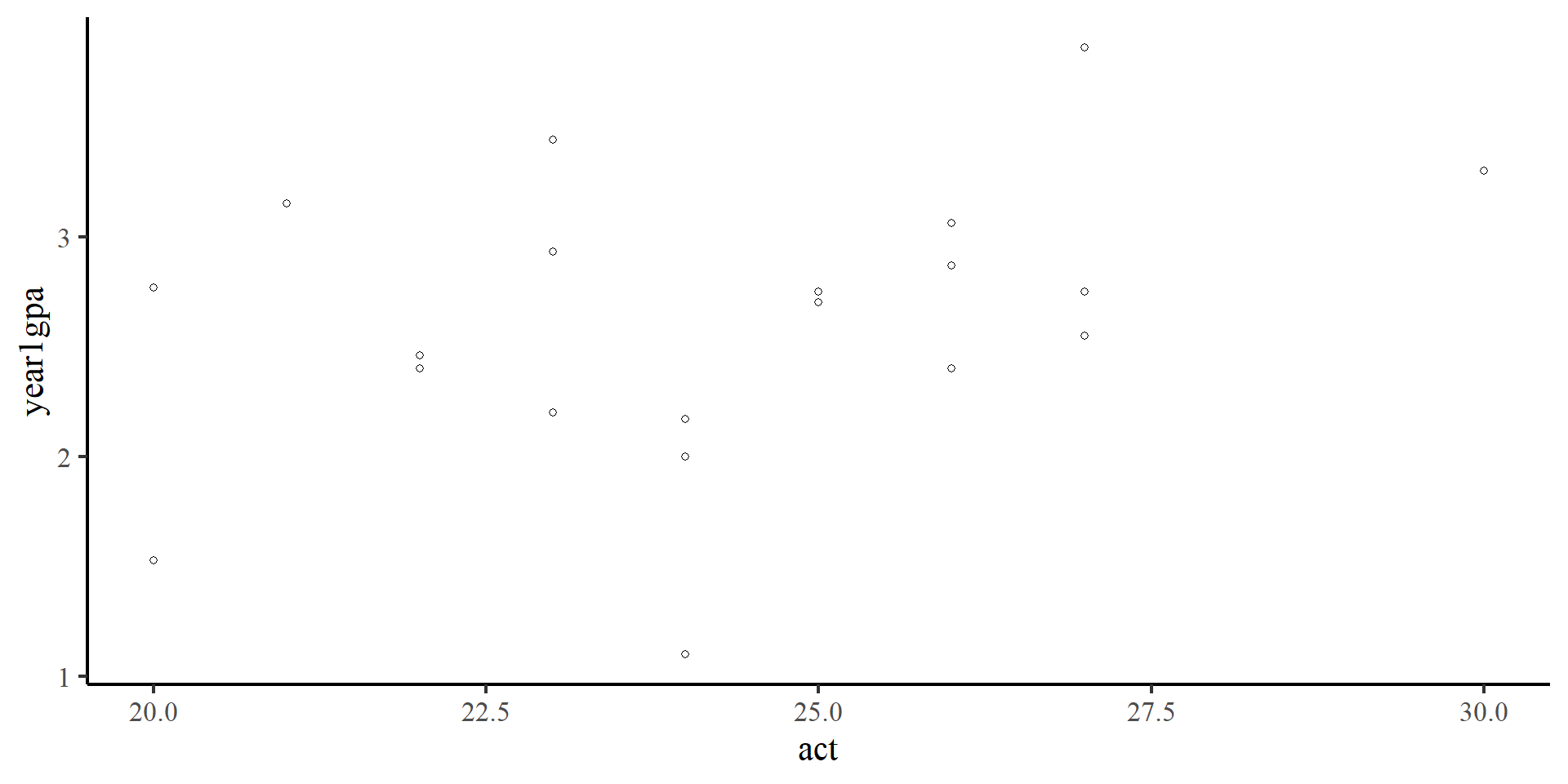
There seems to be a positive trend (as ACT scores increase, first year GPA also increases). Let’s draw a regression line to confirm that.

Scatterplot

A scatterplot is ideal for visualizing bivariate relations

ggplot(GPA,
      aes(x = act, y = year1gpa)) +
      geom_point() +
      geom_smooth(method = "lm", 
                  se = FALSE)

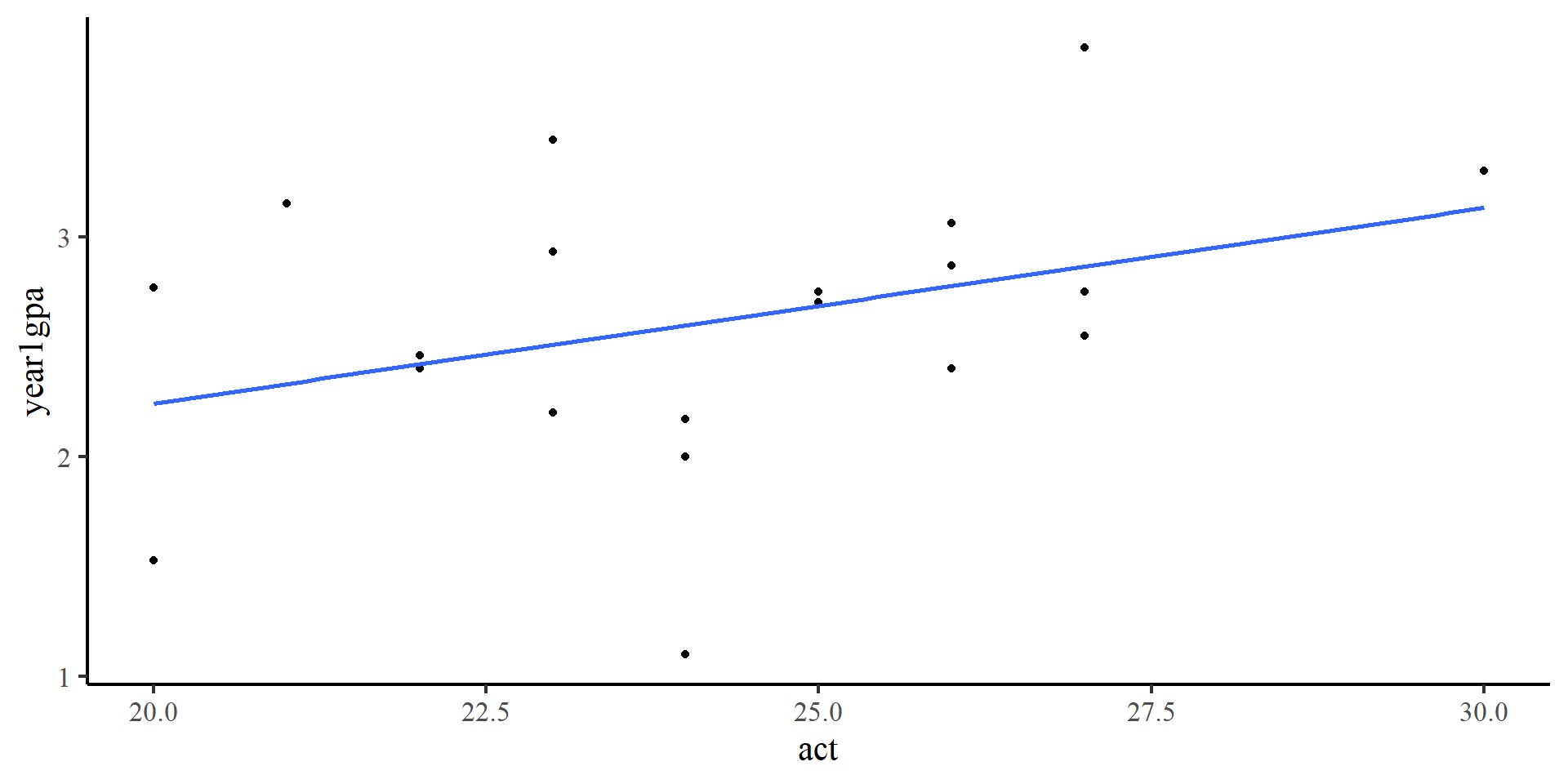
The regression line confirms our observation.

Scatterplot

A scatterplot is ideal for visualizing bivariate relations

ggplot(GPA,
      aes(x = act, y = year1gpa)) +
      geom_point() +
      geom_smooth(method = "lm", 
                  se = FALSE) +
      geom_smooth(method = "loess",
                  color = "red",
                  se = FALSE)

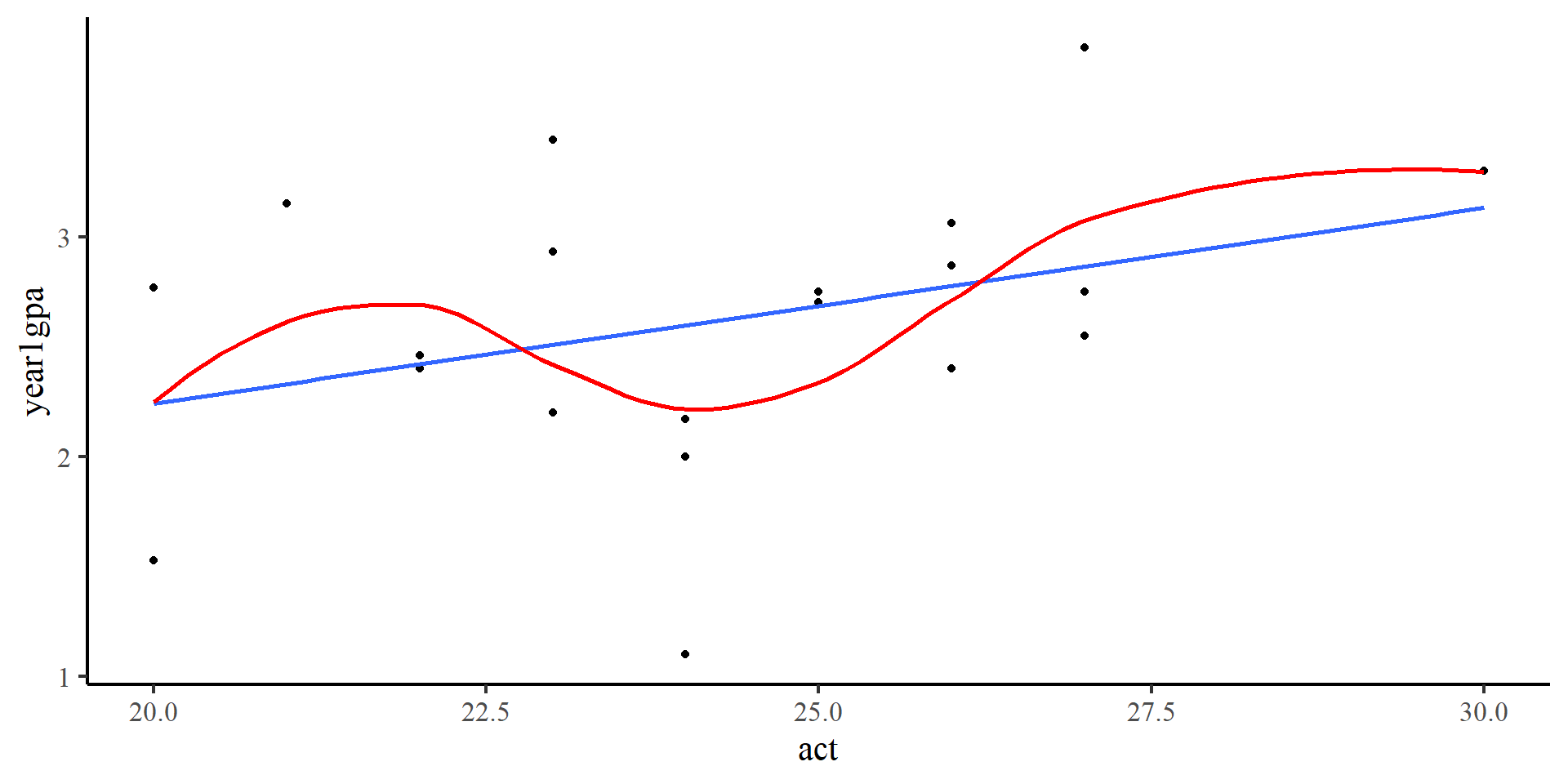
We can add a loess line, which usually helps with checking for non-linear trends. However, here it should probably not be trusted much. Why? Because there are too few points (only 20), and the loess line is influenced by just a few observations.

Correlation

Correlation, usually denoted with \(r\), measures the strength of linear association between two variables (always ranges between \(-1\) and \(1\)).

The Math

\(r_{xy} = \frac{ \sum_{i=1}^{n}(x_i-\bar{x})(y_i-\bar{y}) }{\sqrt{\sum_{i=1}^{n}(x_i-\bar{x})^2}\sqrt{\sum_{i=1}^{n}(y_i-\bar{y})^2}}\)

Although this formula looks a bit scary, we can break it down in familiar elements:

  • \(\sum_{i=1}^{n}(x_i-\bar{x})(y_i-\bar{y})\) is the covariance (equivalent to correlation) between \(x\) and \(y\)
  • \(\sqrt{\sum_{i=1}^{n}(x_i-\bar{x})^2}\) is equivalent to the variance of \(x\)
  • \(\sqrt{\sum_{i=1}^{n}(y_i-\bar{y})^2}\) is equivalent to the variance of \(y\)
  • all the denominator does is guarantee that \(r\) is always between \(-1\) and \(1\). It standardizes the covariance.

The code

Calculating correlations by hand is very simple in R

cov_xy <- sum((GPA$year1gpa - mean(GPA$year1gpa)) * (GPA$act - mean(GPA$act)))
var_x <- sqrt(sum((GPA$year1gpa - mean(GPA$year1gpa))^2))
var_y <- sqrt(sum((GPA$act - mean(GPA$act))^2))

cov_xy/(var_x * var_y)
[1] 0.3606251

In practice you would just use the cor() function to calculate the correlation between two variables.

cor(GPA$year1gpa, GPA$act)
[1] 0.3606251

Significance Test for Correlations

The cor() function does not run any significance test for our correlations. To get significance tests for correlations, you can use the corr_test() function from the psych package

# Note that the line below is equivalent to corr.test(GPA$year1gpa, GPA$act)
psych::corr.test(GPA)
Call:psych::corr.test(x = GPA)
Correlation matrix 
         year1gpa  act
year1gpa     1.00 0.36
act          0.36 1.00
Sample Size 
[1] 20
Probability values (Entries above the diagonal are adjusted for multiple tests.) 
         year1gpa  act
year1gpa     0.00 0.12
act          0.12 0.00

 To see confidence intervals of the correlations, print with the short=FALSE option

The output of corr_test() can be ever so slightly confusing 🤨

To get more insight into what R functions actually do, sometimes you want to save results as objects and explore the object content.

correlation <- corr.test(GPA)

# this prints the name of all the elements of the `correlation` object
names(correlation)
 [1] "r"      "n"      "t"      "p"      "p.adj"  "se"     "sef"    "adjust"
 [9] "sym"    "ci"     "ci2"    "ci.adj" "stars"  "Call"  

Turns out the corr_test() function stores much more information than it lets on. This is the case for most R functions, which will save a lot of information inside a list object.

corr_test() output

Keep an eye out for the matching output between the table below and the code on the right.


corr.test(GPA)
Call:corr.test(x = GPA)
Correlation matrix 
         year1gpa  act
year1gpa     1.00 0.36
act          0.36 1.00
Sample Size 
[1] 20
Probability values (Entries above the diagonal are adjusted for multiple tests.) 
         year1gpa  act
year1gpa     0.00 0.12
act          0.12 0.00

 To see confidence intervals of the correlations, print with the short=FALSE option
  • The r element is the correlation matrix between our 2 variables
  • correlation$r
              year1gpa       act
    year1gpa 1.0000000 0.3606251
    act      0.3606251 1.0000000
  • The p element is the p-value for every element of the correlation matrix
  • correlation$p
              year1gpa       act
    year1gpa 0.0000000 0.1182837
    act      0.1182837 0.0000000
  • The ci element is the confidence interval (which is not printed by default)
  • correlation$ci
                    lower         r     upper         p
    yr1gp-act -0.09744666 0.3606251 0.6926154 0.1182837

Running a Regreassion in R

To run regressions in R we use the lm() function (which stands for linear model). In the case of our data, we want to see whether ACT scores (act) predict GPA in the first year of college (year1gpa)

reg <- lm(year1gpa ~ act, data = GPA)
summary(reg)

Call:
lm(formula = year1gpa ~ act, data = GPA)

Residuals:
     Min       1Q   Median       3Q      Max 
-1.49728 -0.32916  0.02715  0.31914  0.99612 

Coefficients:
            Estimate Std. Error t value Pr(>|t|)
(Intercept)  0.46452    1.32082   0.352    0.729
act          0.08886    0.05417   1.640    0.118

Residual standard error: 0.6123 on 18 degrees of freedom
Multiple R-squared:  0.1301,    Adjusted R-squared:  0.08172 
F-statistic: 2.691 on 1 and 18 DF,  p-value: 0.1183

lm(Y ~ X, data = your data)

  • Y: the name of your dependent variable (DV)
  • X: the name of your independent variable (IV)
  • data = your data: The data that contains your variables

NOTE: if we were to just run lm(year1gpa ~ act), we would get an error. Neither year1gpa and act are objects in our R environment. We need to tell R where to find year1gpa and act by adding data = GPA.

Interpreting Regression Output

reg <- lm(year1gpa ~ act, data = GPA)
summary(reg)

Call:
lm(formula = year1gpa ~ act, data = GPA)

Residuals:
     Min       1Q   Median       3Q      Max 
-1.49728 -0.32916  0.02715  0.31914  0.99612 

Coefficients:
            Estimate Std. Error t value Pr(>|t|)
(Intercept)  0.46452    1.32082   0.352    0.729
act          0.08886    0.05417   1.640    0.118

Residual standard error: 0.6123 on 18 degrees of freedom
Multiple R-squared:  0.1301,    Adjusted R-squared:  0.08172 
F-statistic: 2.691 on 1 and 18 DF,  p-value: 0.1183

\[Y = b_0 + b_1X + e\]

  • \(Y\) = The DV (year1gpa)
  • \(b_0 = 0.46\), the predicted value of \(Y\) when \(X = 0\), AKA the intercept
  • \(b_1 = 0.09\), the predicted change in \(Y\) per each 1-unit increase in \(X\), AKA the slope
  • \(X\) = the IV (act)
  • \(\epsilon = 0.61\), the expected spread of the residuals \(e\) around the regression line, AKA the residual variance*

*NOTE: if you just do applied research, you will probably never have to think about \(\epsilon\). However, there is great insight gained into understanding why it’s there (refer to appendix)

Making Predictions

For many reasons, once we have a regression model, we may want to predict values of \(Y\) based on some values of \(X\).

From the previous slide, we found that \(\hat{Y} = .46 + .09\times X\) (we don’t look at \(e\) when making predictions!) So, to find values of \(\hat{Y}\) we plug in some values of \(X\).
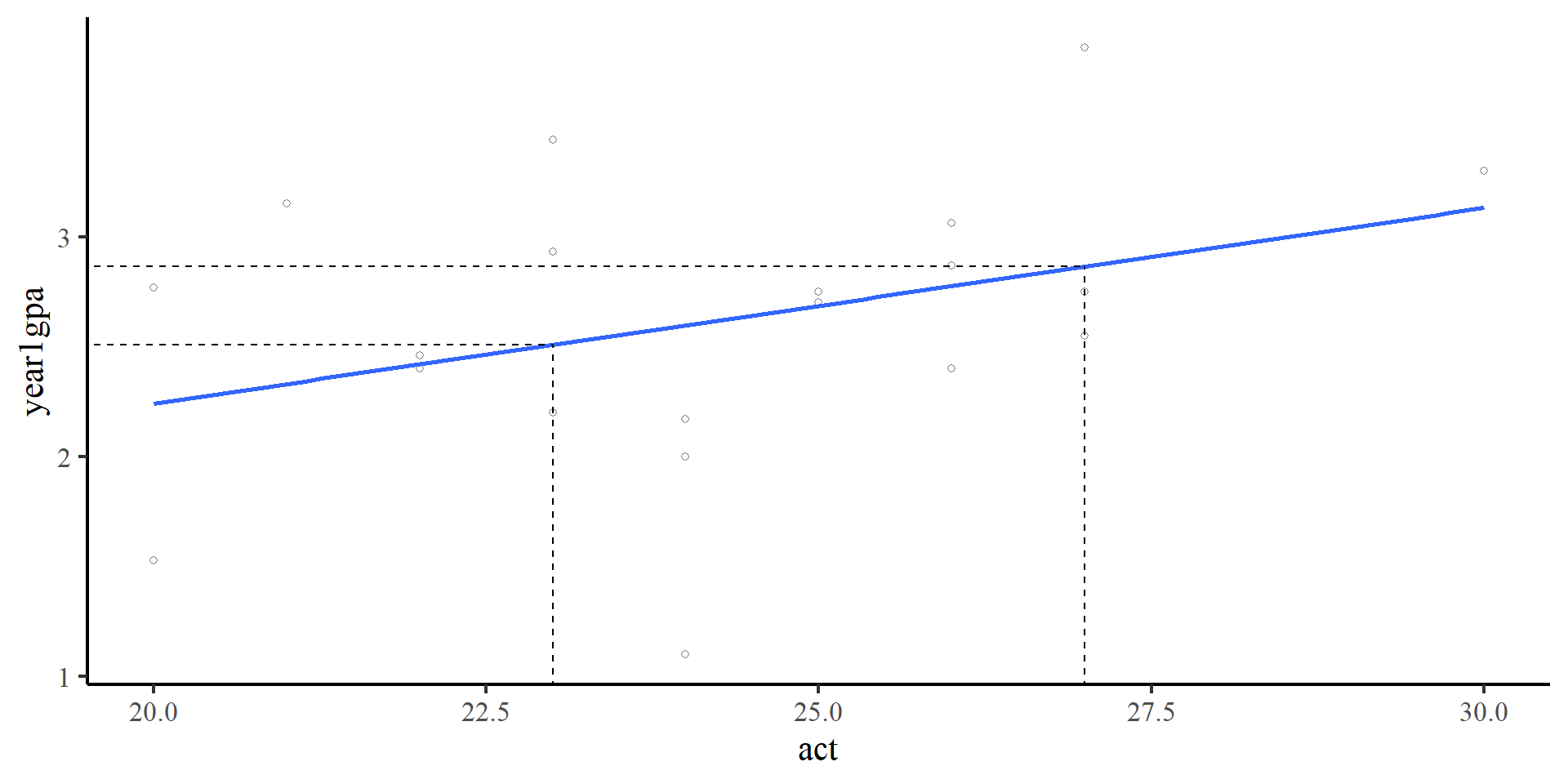
  • If \(X = 23\), then \(\hat{Y} = .46 + .09\times23 = 2.53\)
  • If \(X = 27\), then \(\hat{Y} = .46 + .09\times27 = 2.89\)
Predictions Represent the mean expected value of Y given some value of X. Predictions are always on the regression line
Plot Code
ggplot(GPA,
       aes(x = act, y = year1gpa)) +
  geom_point(alpha = .5, shape = 1) +
  geom_smooth(method = "lm",
              se = FALSE) +
  geom_segment(x = 23,
               xend = 23,
               y = 0,
               yend = coef(reg)[1] + coef(reg)[2]*23,
               linetype = 2) +
    geom_segment(x = 0,
                 xend = 23,
                 y = coef(reg)[1] + coef(reg)[2]*23,
                 yend = coef(reg)[1] + coef(reg)[2]*23,
                 linetype = 2)  +
  geom_segment(x = 27,
               xend = 27,
               y = 0,
               yend = coef(reg)[1] + coef(reg)[2]*27,
               linetype = 2) +
    geom_segment(x = 0,
                 xend = 27,
                 y = coef(reg)[1] + coef(reg)[2]*27,
                 yend = coef(reg)[1] + coef(reg)[2]*27,
                 linetype = 2)   

Making Predictions The “right way”

Whenever you are doing calculations in R, you should never copy and paste output numbers because there may be rounding error (and your code will not be generalizable!).

For any lm() object, the coef() function will extract the exact coefficient values (intercepts and slopes in order of predictor):
coef(reg)
(Intercept)         act 
 0.46452446  0.08886497 
So, the appropriate way of calculating the predicted value of \(Y\) if \(X = 23\) is:
as.numeric(coef(reg)[1] + coef(reg)[2]*23)
[1] 2.508419
Usually, you need predictions for some new data, so you would use the predict() function. The predict function requires that you input data that has the exact same structure as the original data, but without the \(Y\) variable.
# first we create new data that we want to get predictions on
pred_dat <- data.frame("act" = seq(20, 30, by = .01))
Here I save the predictions as a new variable. Look at the pred_dat object after running the code below:
pred_dat$y_pred <- predict(reg, pred_dat)
str(pred_dat)
'data.frame':   1001 obs. of  2 variables:
 $ act   : num  20 20 20 20 20 ...
 $ y_pred: num  2.24 2.24 2.24 2.24 2.25 ...

Predictions and residuals

lm() objects also save predictions for all data points (\(\hat{Y}_i\)) and the residuals for all data points (\(e_i\)).

Predictions

predictions <- fitted(reg)
str(predictions, give.attr = FALSE)
 Named num [1:20] 2.24 2.24 2.33 2.42 2.42 ...

These are the predicted values of \(Y\) given the observed \(X\) values.

Residuals

residuals <- residuals(reg)
str(residuals, give.attr = FALSE)
 Named num [1:20] -0.7118 0.5282 0.8193 -0.0196 0.0404 ...
These are the differences between the observed values of \(Y\) and the predicted values of \(Y\), so \(e_i = Y_i - \hat{Y}_i\).

The residuals always sum to 0:

sum(residuals)
[1] 4.024558e-16

Dimensions of Objects

You should notice that both predictions and residuals are vectors of length 20. This may seem obvious (if it is not, give it some thought), but checking the dimensions of objects is always a good way of making sure that you are getting what you expected from an R function.

Visualizing Predictions and Residuals

ggplot(GPA,
 aes(x = act, y = year1gpa)) +
 geom_point(shape = 1) 
  • The black circles are the observed data points.

Visualizing Predictions and Residuals

ggplot(GPA,
 aes(x = act, y = year1gpa)) +
 geom_point(shape = 1) +
 geom_point(aes(y = predictions), 
                colour = "red")
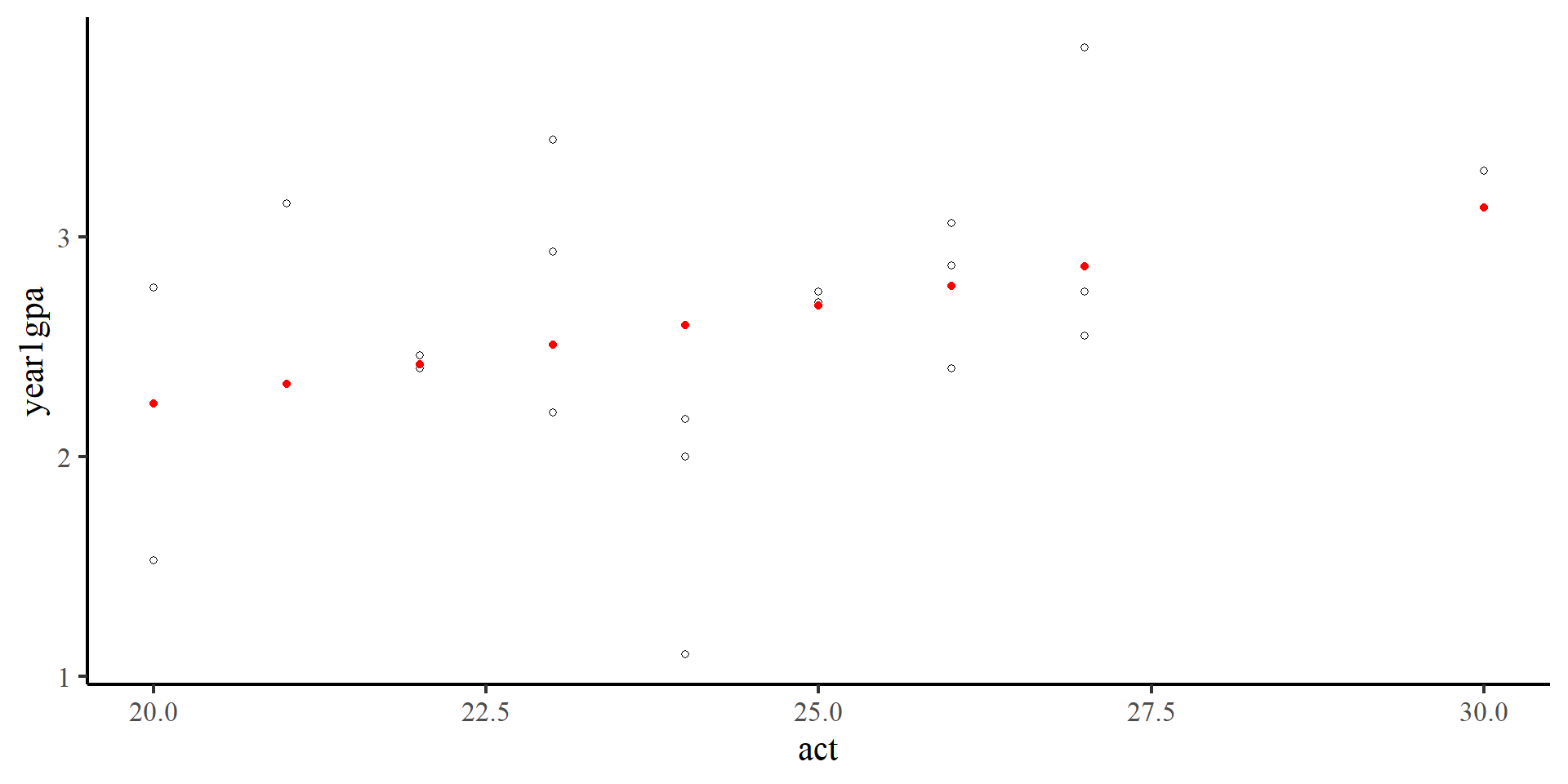
  • The black circles are the observed data points.
  • The red dots are the predicted values for our data points.

Visualizing Predictions and Residuals

ggplot(GPA,
 aes(x = act, y = year1gpa)) +
 geom_point(shape = 1) +
 geom_point(aes(y = predictions), 
                color = "red") +
 geom_segment(y = predictions,
              x = GPA$act,
              xend = GPA$act,
              yend = GPA$year1gpa,
              linetype = 2,
              alpha = .5)
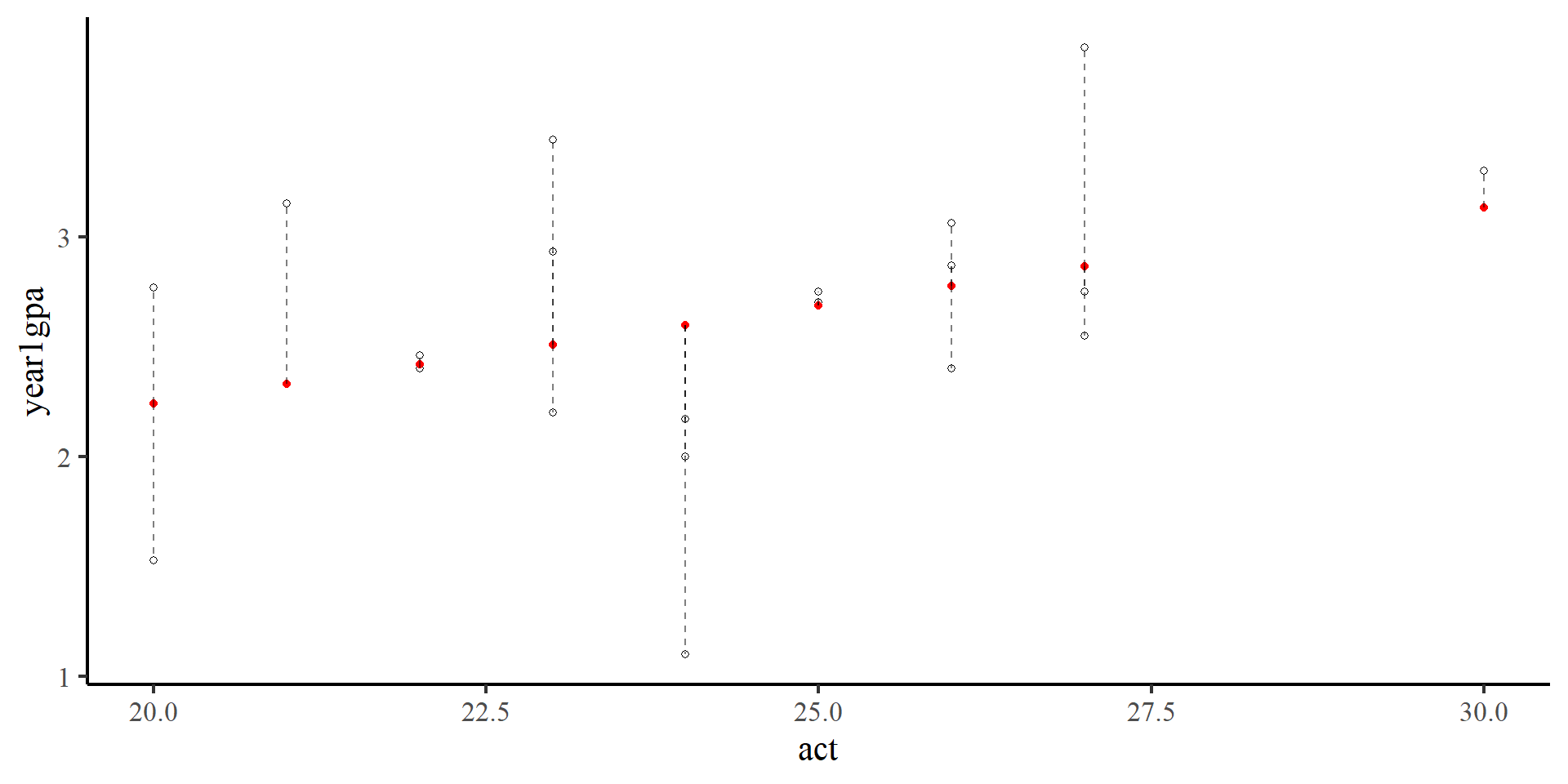
  • The black circles are the observed data points.
  • The red dots are the predicted values for our data points.
  • The length of the dashed lines are the residuals, which represent the difference between observed values (black circles) and predicted values (red dots)

Normality of Residuals

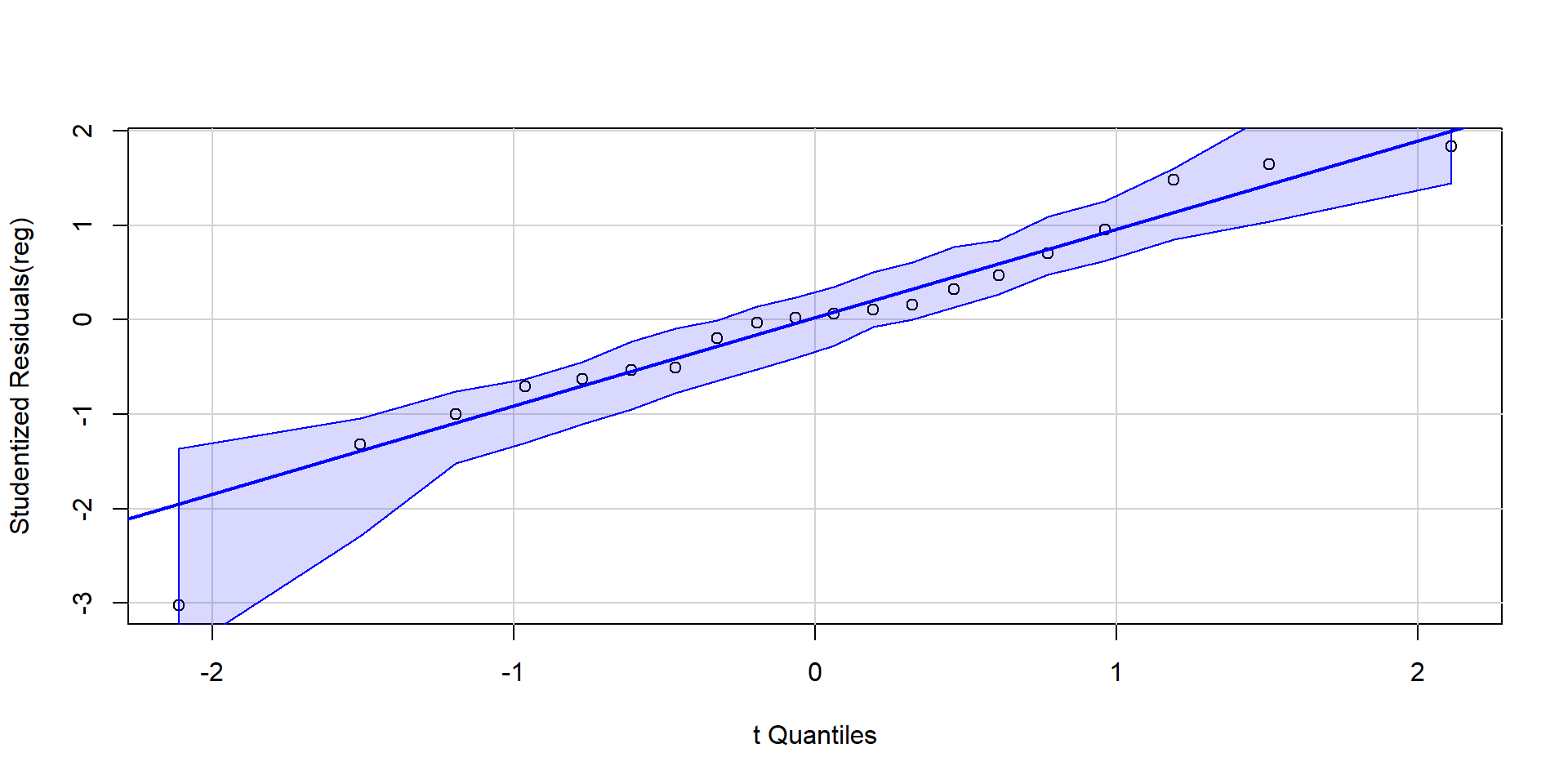
The fact that residuals must be normally distributed is an assumption built into regression (why? The appendix explains it). QQplots can help us infer how much residuals deviate from normality.

The qqPlot() function from the car package is helpful here:

car::qqPlot(reg, id = FALSE)

As long as roughly 95% of the residuals (dots) are within the band, there should be no cause for concern.

NOTE: since the shaded area represents a 95% confidence interval, seeing roughly 5% of the residuals outside would be within our expectations.

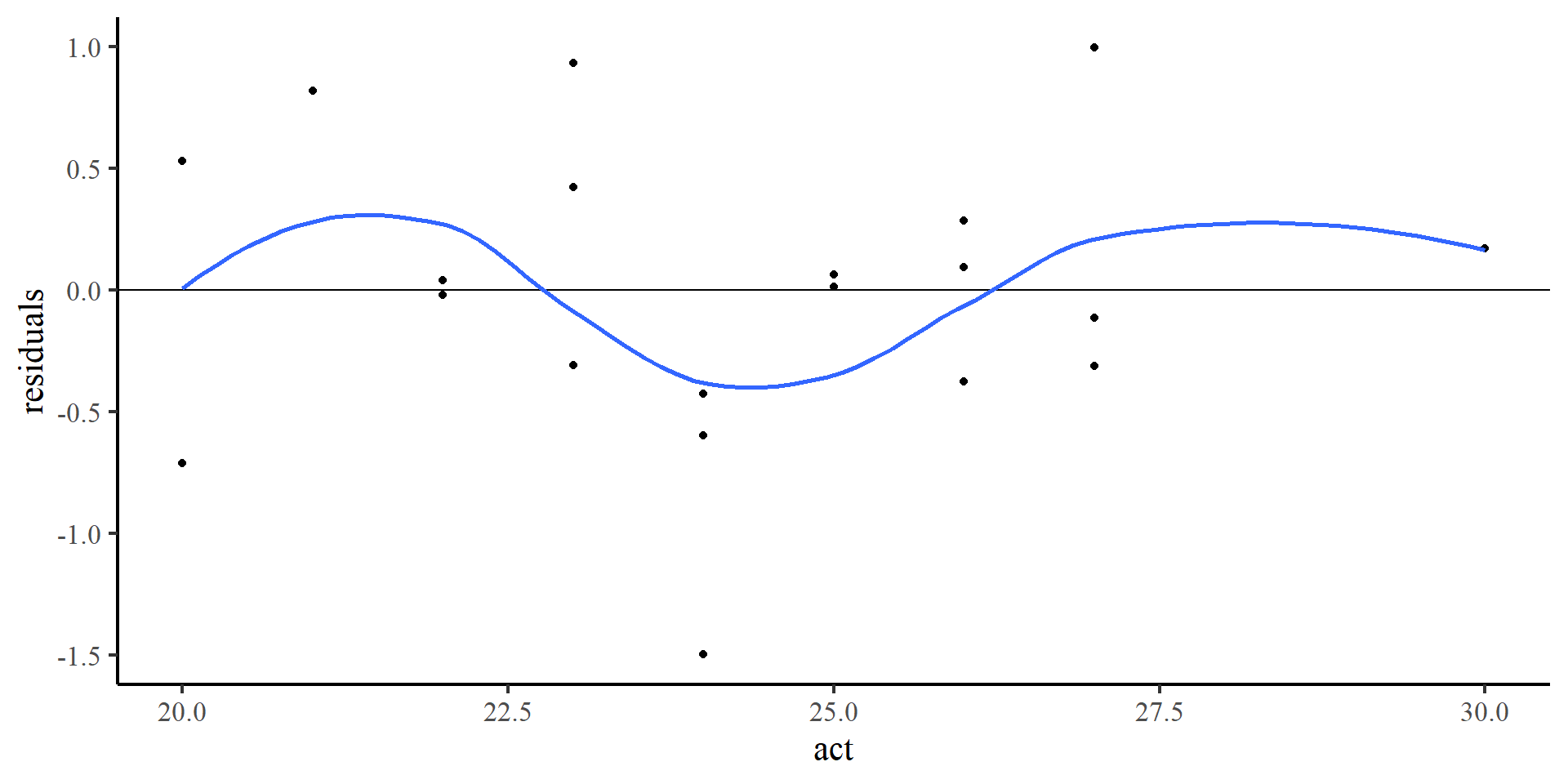
Plotting Residuals Against Predictors

Another way of checking that residuals are evenly distributed around 0, and do not show any type of relationship with the predictor.

ggplot(GPA, 
  aes(x = act, y = residuals)) +
  geom_point() +
  geom_hline(yintercept = 0) +
  geom_smooth(method = "loess",
              se = FALSE)

Once again, the loess line does not do too well because there are few points. The points look reasonably distributed around the 0 line to me.

Standardized Regression Output

To run standardized regression in R we first standardize our data. The scale() function standardizes (or mean-centers) data. The scale() function can be a bit particular (see here if you have troubles with it)
GPA_std <- data.frame(scale(GPA))

reg_std <- lm(year1gpa ~ act, data = GPA_std)
summary(reg_std)

Call:
lm(formula = year1gpa ~ act, data = GPA_std)

Residuals:
     Min       1Q   Median       3Q      Max 
-2.34329 -0.51515  0.04249  0.49945  1.55896 

Coefficients:
             Estimate Std. Error t value Pr(>|t|)
(Intercept) 1.172e-16  2.143e-01    0.00    1.000
act         3.606e-01  2.198e-01    1.64    0.118

Residual standard error: 0.9583 on 18 degrees of freedom
Multiple R-squared:  0.1301,    Adjusted R-squared:  0.08172 
F-statistic: 2.691 on 1 and 18 DF,  p-value: 0.1183

The meaning of the results does not change, just the coefficients. So…

\[Y = 0 + .36X,\]

\(.36\) is also the correlation coefficient between act and year1gpa. Just remember that X and Y are in standard deviation units.

🧐 Standardizing our variables simply changes measurement units. You can think of it as switching between degrees Fahrenheit and Celsius. the state of the world (temperature) remains the same, only the numbers that we use to describe it change 🧘

References

Fox, J., Weisberg, S., Price, B., Adler, D., Bates, D., Baud-Bovy, G., Bolker, B., Ellison, S., Firth, D., Friendly, M., Gorjanc, G., Graves, S., Heiberger, R., Krivitsky, P., Laboissiere, R., Maechler, M., Monette, G., Murdoch, D., Nilsson, H., … R-Core. (2024). Car: Companion to Applied Regression (Version 3.1-3) [Computer software]. https://cran.r-project.org/web/packages/car/index.html
Revelle, W. (2024). Psych: Procedures for Psychological, Psychometric, and Personality Research (Version 2.4.6.26) [Computer software]. https://cran.r-project.org/web/packages/psych/index.html
Wickham, H., & RStudio. (2023). Tidyverse: Easily Install and Load the ’Tidyverse (Version 2.0.0) [Computer software]. https://cran.r-project.org/web/packages/tidyverse/index.html
Appendix: The “true” Regression Model and its assumptions

The “true” Regression Model

You may have seen regression models formulated in different ways. Turns out, the notation can have subtle differences that change the meaning of what you are looking at:

    \(Y_i = b_0 + b_1X_i + e_i\)

    \(\hat{Y_i} = b_0 + b_1X_i\)

    \(\hat{Y} = b_0 + b_1X\)

    Where

  • \(Y_i\): the observed \(Y\) value of participant \(i\)
  • \(\hat{Y_i}\): the predicted \(Y\) value of participant \(i\)
  • \(\hat{Y}\): the predicted \(Y\) value (e.g., predictions on data not yet observed)

Now, the “real” regression model is actually

\(Y \sim N(\mu = b_0 + b_1X, \sigma = \epsilon)\)

in math, “\(\sim\)” reads “distributed as”

Equivalently, you may see this written as

\(Y = b_0 + b_1X + e\) where, \(e \sim N(\mu = 0, \sigma = \epsilon)\)

The second formulation is more explicit about the main assumption of regression, that the residuals, \(e\), are normally distributed. Let’s explore a bit more…


NOTE: regression makes no assumption about the distribution of the predictors (i.e., \(X\) need not to be normally distributed, regression does not care)

The Data Generating Process

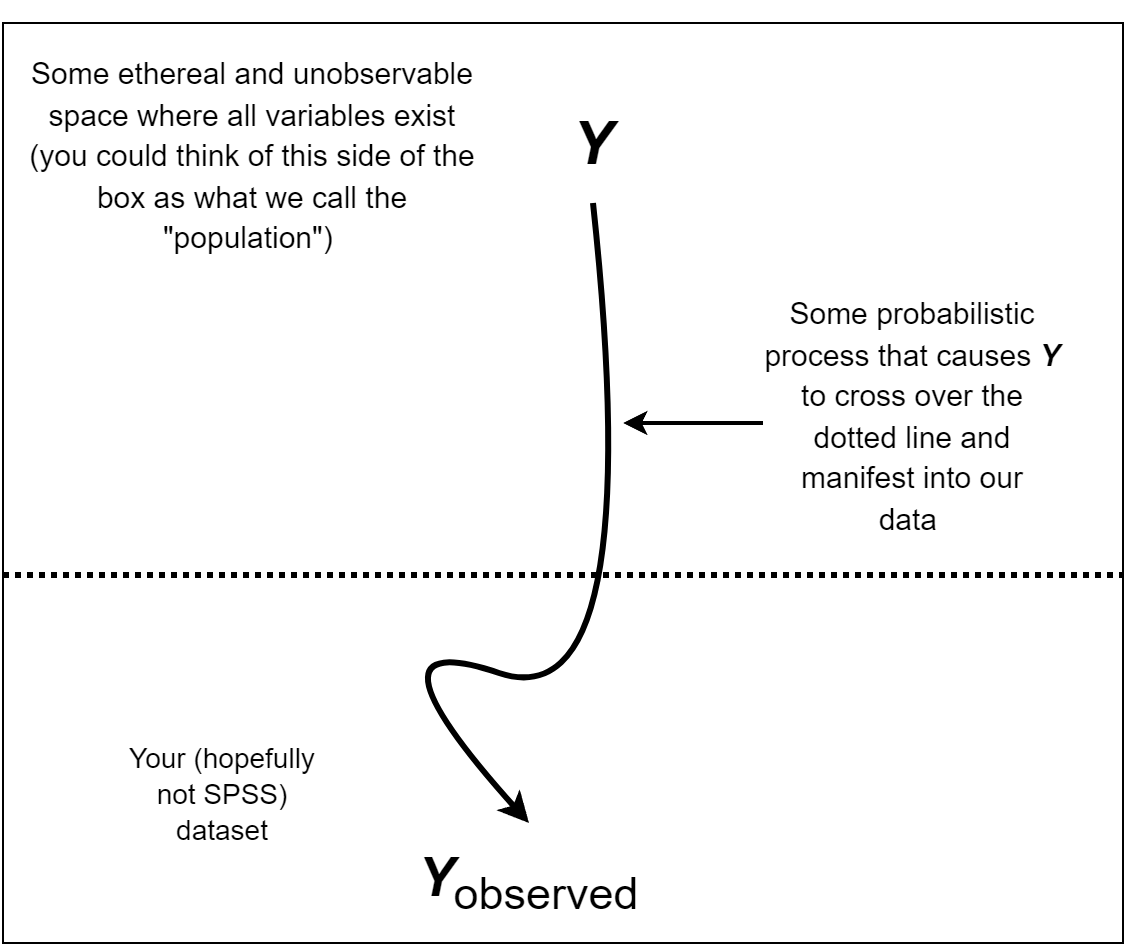
On the previous slide you saw we had \(Y_i\), \(\hat{Y_i}\), \(\hat{Y}\), and crucially, just \(Y\) (). One important thing to keep in mind is that, whenever we run statistics, the question that we are asking is really…

What is the probabilistic process by which the data that I observed came into existence? (i.e., the data generating process)

Likewise, regression tries to answer how your observed sample of the \(Y\) random variable comes into existence.


The \(Y \sim N(b_0 + b_1X, \epsilon)\) (for simplicity, I dropped the \(\mu\) and \(\sigma\)) is how linear regression thinks \(Y\) crosses over the dotted line and ends up in our data.

The Meaning of A regression model

The regression output was:

summary(reg)

Call:
lm(formula = year1gpa ~ act, data = GPA)

Residuals:
     Min       1Q   Median       3Q      Max 
-1.49728 -0.32916  0.02715  0.31914  0.99612 

Coefficients:
            Estimate Std. Error t value Pr(>|t|)
(Intercept)  0.46452    1.32082   0.352    0.729
act          0.08886    0.05417   1.640    0.118

Residual standard error: 0.6123 on 18 degrees of freedom
Multiple R-squared:  0.1301,    Adjusted R-squared:  0.08172 
F-statistic: 2.691 on 1 and 18 DF,  p-value: 0.1183

if \(Y \sim N(b_0 + b_1X, \epsilon)\) is our model…

…what we are saying with the results on the left is that \(Y\) is normally distributed with

  • mean of \(0.46 + 0.08X_{ACT}\), the \(b_0 + b_1X\) part, and

  • standard deviation of \(0.61\), the \(\epsilon\) (residual variance) part.

Let’s look a bit more into what the mean and standard deviation represent conceptually!

Predictable and Unpredictable Parts

You think of the normal distribution as a predictable and unpredictable part. The predictable part is the mean, whereas the unpredictable part is the standard deviation.

For example, if I generate data from a normal distribution with 0 standard deviation

# generate 5 observations from N~(2, 0)
rnorm(5, mean = 2, sd = 0)
[1] 2 2 2 2 2

The outcome is fully predictable, and we always get 2.

set.seed(2356)
# add randomness to observations on the left
rnorm(5, mean = 2, sd = 0) + 
rnorm(5, mean = 0, sd = 4) 
[1]  1.416078  1.911307 -1.559635 -5.324674  2.095688
# the two lines above are equivalent to just
# set.seed(2356)
# rnorm(5, mean = 2, sd = 4) 

In contrast, here we know that our values will be centered around 2, the mean. However, there is unpredictable randomness introduced by the standard deviation of 4.

In regression, we swap the mean of the normal distribution for the regression line (predictable part), and the randomness for \(\epsilon\), the residual variance (unpredictable part).

A Visual Representation

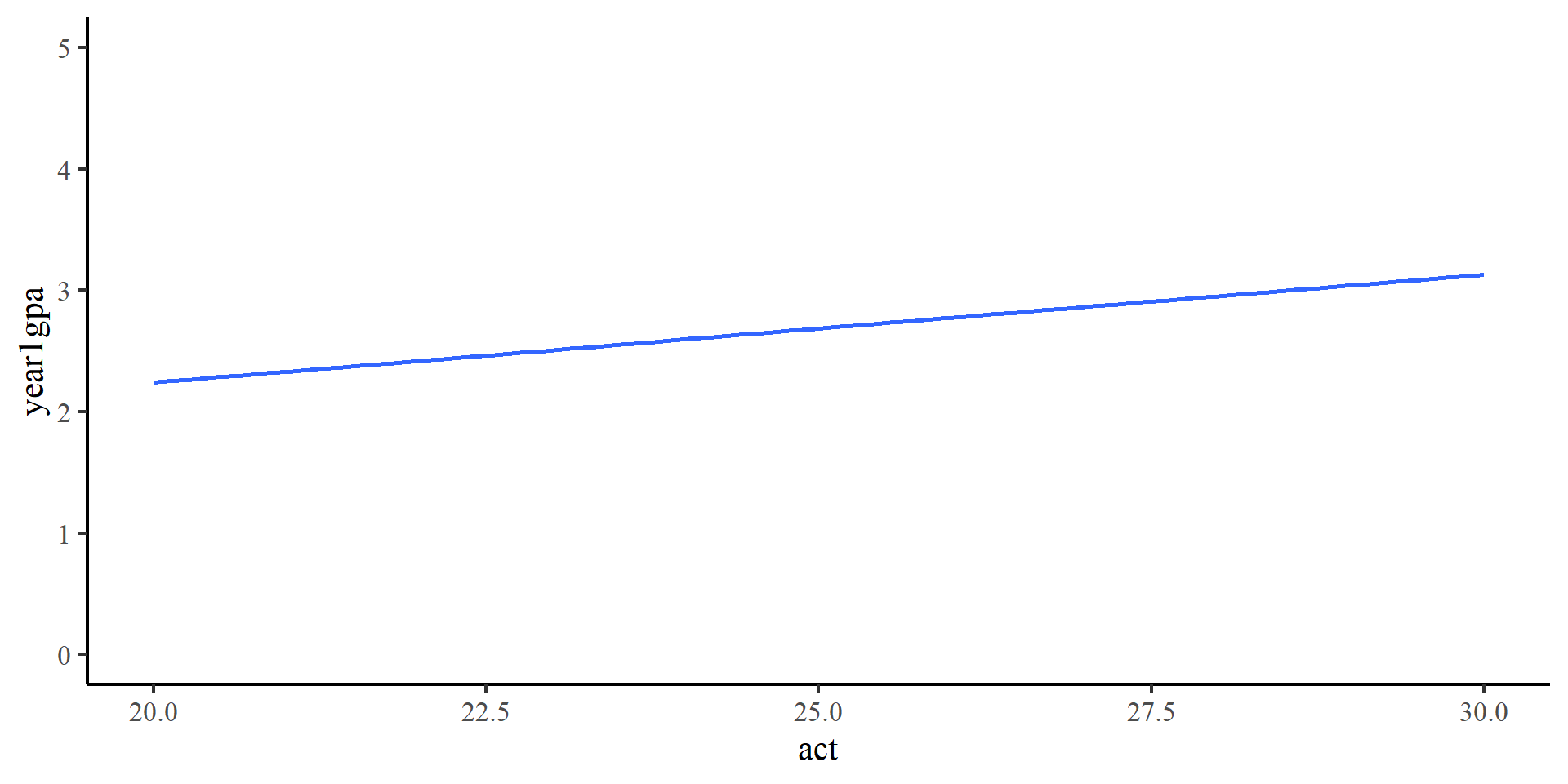
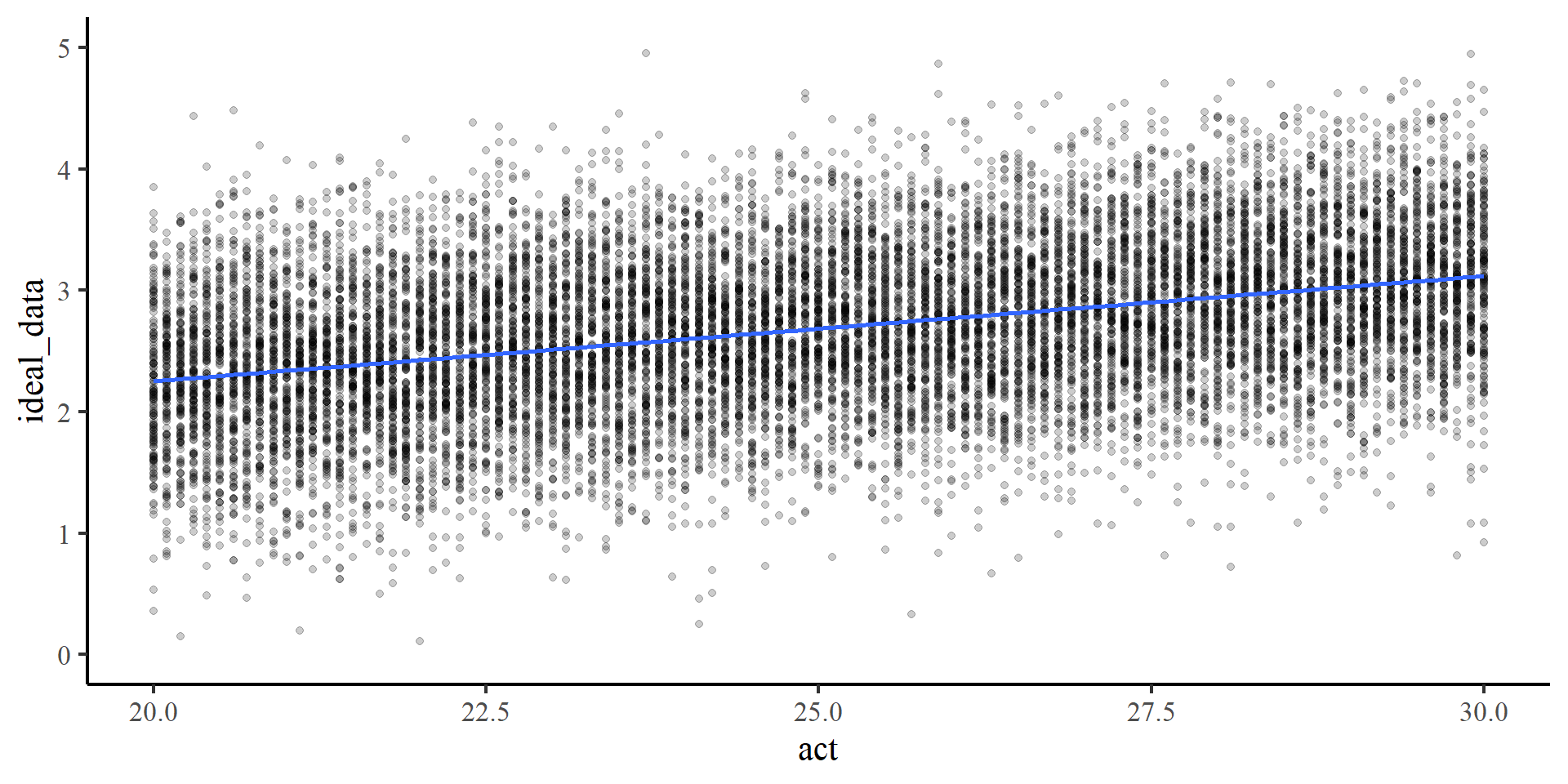
We can visualize what our \(Y\) variable should look like according to our regression model in a perfect world.

ggplot(GPA, 
  aes(x = act, y = year1gpa)) +  
  # assume we have no data yet
  geom_point(alpha = 0) +
      geom_smooth(method = "lm", se = FALSE) +
  ylim(0, 5)

The line is what the mean of year1gpa should be at every value of act. However, there is no data yet.

A Visual Representation

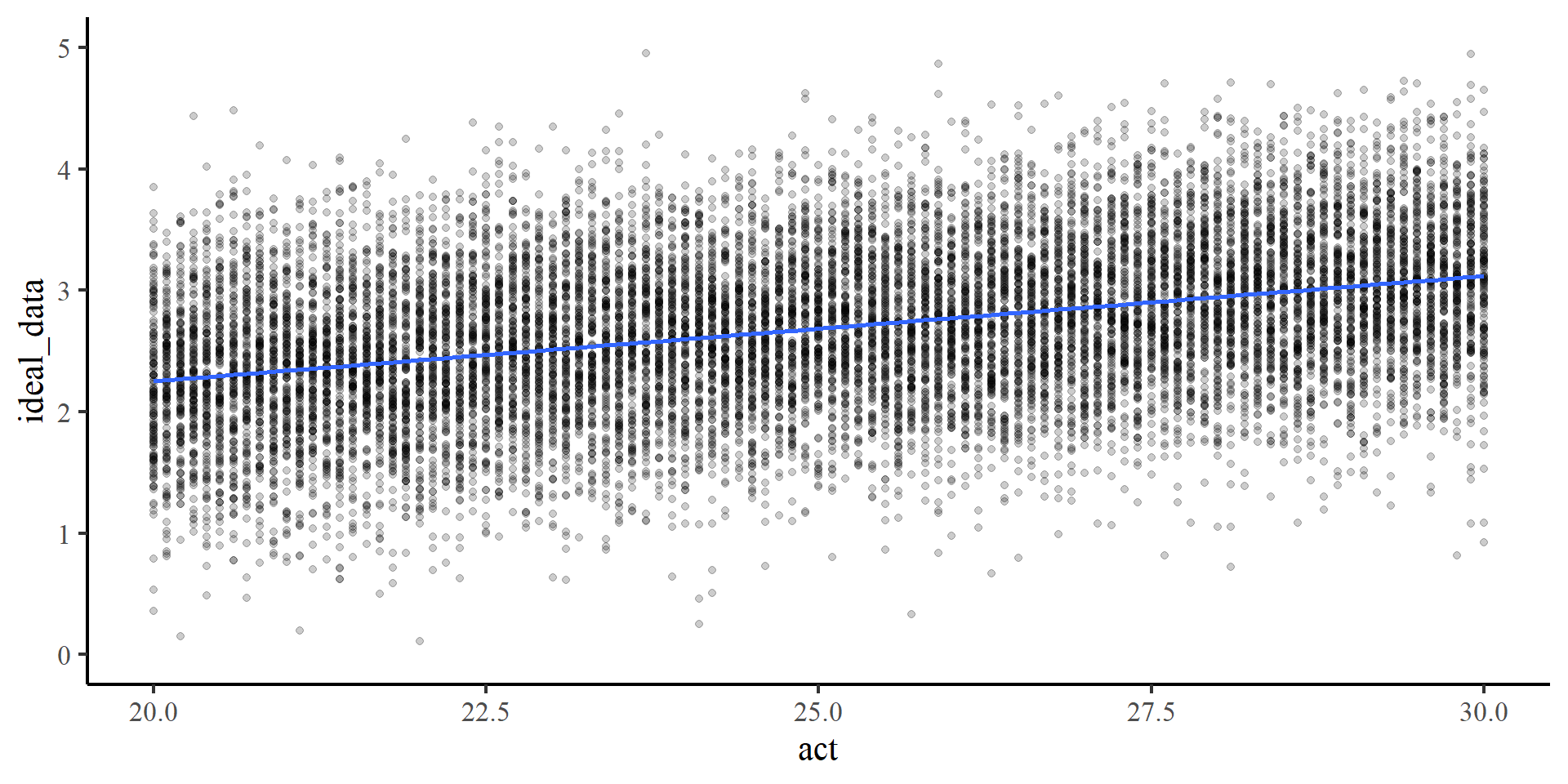
We can visualize what our \(Y\) variable should look like according to our regression model in a perfect world.

Plot Code
# Generate idealized data

set.seed(7757)

# generate X values
act <- rep(seq(min(GPA$act), max(GPA$act), by =.1), 150)

# the code below generates data according to the regression model

intercept <- coef(reg)[1]
slope <- coef(reg)[2]
residual_var <- sigma(reg)

ideal_data <- rnorm(length(act), mean = intercept + act*slope, sd = sigma(reg))

# plot the idealized data

ggplot(mapping =  aes(x = act, y = ideal_data)) +  
  geom_point(alpha = .2)+
      geom_smooth(method = "lm", se = FALSE) +
  ylim(0, 5)

Each “column of dots” is normally distributed around the line, with standard deviation of \(.61\), the residual variance (\(\epsilon\)). The dots are essentially our residuals, \(e\).

This is the data our regression model expects to see

The \(Y\) variable looking like this is the only “assumption” of regression.

Statistical Models VS Reality

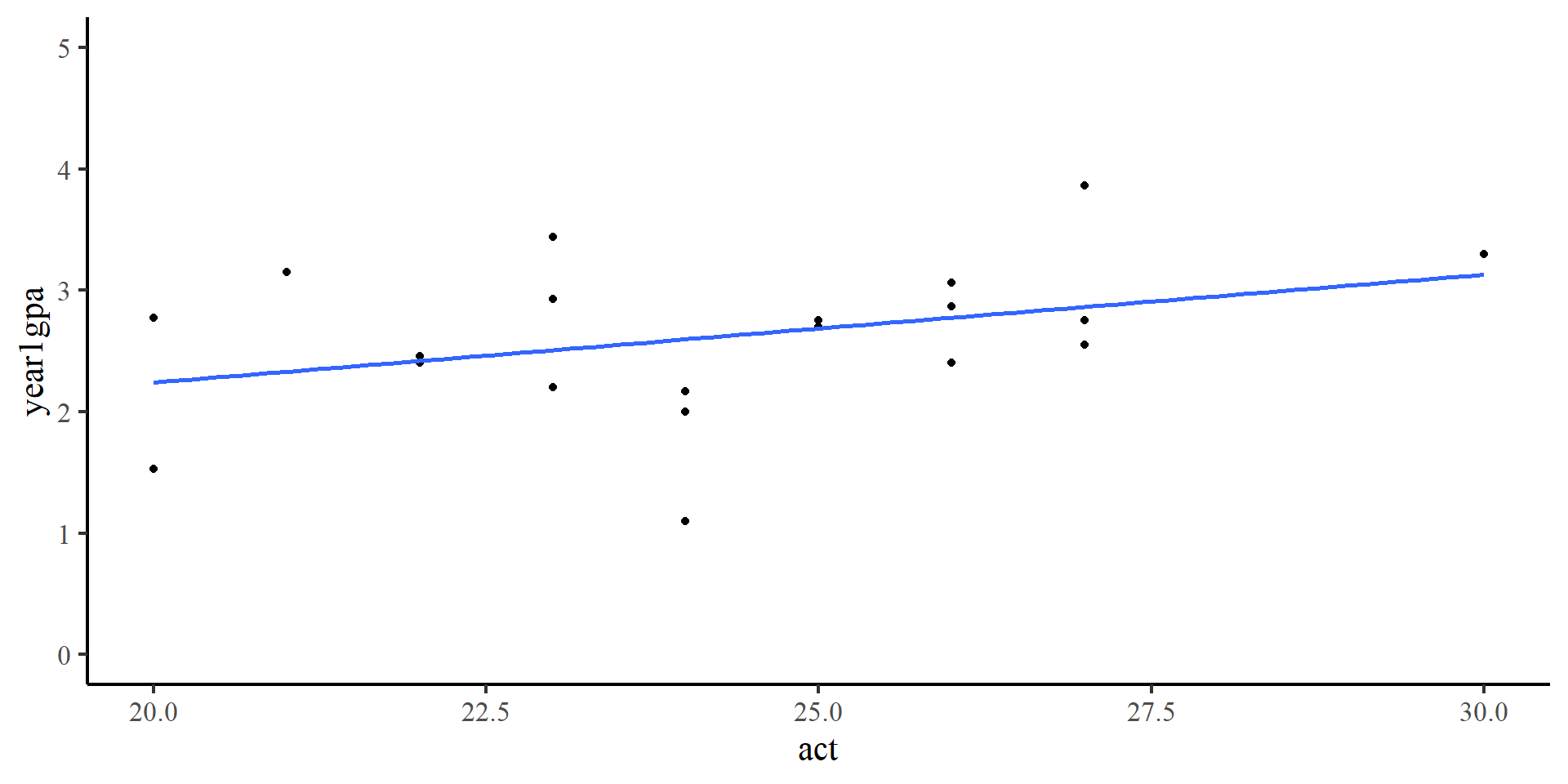
The \(Y\) variable never looks like this.

This is what the \(Y\) variable looks like usually (our data).

Violating assumptions? Assumptions are \(always\) “violated”. To “check assumptions” is knowing what data your model expects to see and evaluating how different the observed data is (QQplots for example, help you do this).

Whether you think your observed data it “too different” from the expected data is usually a very subjective process.